Friday, June 22, 2007
A DIVA'S DAY
Today is one of our girls birthday. Happy Birthday to Bethany Flake!!!!! Today she is the Big 25. How about everyone give her a shout out!!!!!! Sorry I don't have a pic to put along with this post.

Thursday, June 21, 2007
Digital Scrapbooking!
Hey Sugar & Spice sistahs! I asked my incredibly talented and creative sister-in-law to put together a "guest post" for us on digital scrapbooking as there was a post on it awhile ago. She has spent a lot of time compiling a fabulous introduction to digital scrapbooking for us. Enjoy!
Digital Scrapbooking Introduction
Imagine for a minute that the only things you needed to make amazing scrapbook pages are your digital photos and your computer! No more expensive brads, tags, punches, scissors, glue, endless supplies of cardstock, paper, ribbons, embellishments, photos you printed and never use, etc! No more running out of the right colors of anything or getting stuck, or realizing you cropped a picture too small or wishing you had an enlargement! Oh, and to clean up, just shut down Photoshop! Perfect with little kids around! If you have a few minutes, open up your page, and then finish at your leisure. When you are done, email the pages easily to family and friends, print them and back them up on your computer or CD/DVD!
Digital Scrapbooking (DS) is simply AMAZING! I am going to outline just a few things you can do in a program like Adobe PhotoShop CS:
1. Recolor pictures – the sky is the limit here with your creativity, but if you are a traditionalist you can do sepia and black and white instantly…
2. Resize pictures – you can easily and quickly crop or resize any picture, into any shape you like! You can enlarge and reduce!
3. Recolor paper, ribbons and embellishments – do you need just the right color cardstock or ribbon? You can recolor (almost) anything! So, once you stock up on some basic ribbons in digital format, you have every ribbon you will ever need.
4. Go back and undo or edit anything!
5. Print as many copies as you like!
6. Make darling custom photo announcements for baby births, birthday parties or Christmas cards!
So how do you get started?
The best way I know how to tell anyone, and how I learned, is in a class. Check around and see if any local adult education classes, college classes or other places have classes. Ask at your local scrapbook store. Most colleges will have PhotoShop classes, however, this may be hard to translate into scrapbooking and may focus mostly on photos. Just for reference, the class I took was 12 hours long, and I feel like we barely scratched the surface…Another note, and not to be discouraging, but PhotoShop is not something that is easily self-taught…even if you are kind of a computer guru, it would still be hard…
There is a site I know of that does offer an on-line class specifically for Digital Scrapbooking:
http://www.digitalscrapbookplace.com/university/Scrapping101/basics.shtml
These sites offer some tutorials:
http://www.theshabbyshoppe.com/tutorials/software_tutorials.asp
http://scrapbook-elements.com/sbe/index.php?option=com_content&task=section&id=13&Itemid=97
So, one of the fun ways to get interested is to look at Galleries to see the amazing pages other normal people are making! Here are a few of my favorite inspiration spots:
http://twopeasinabucket.kaboose.com/pg.asp?gallery=4
http://www.theshabbyshoppe.com/photopost/showgallery.php?cat=506
http://heatheranndesigns.com/pp/
Deciding if DS is for you!
So after you have perused some sights, looked at some galleries and done a little research on your own, you will need to decide if DS is for you…
1. Selecting a DS program. There are a lot of options out there, but the only 2 programs I recommend are Adobe PhotoShop CS (#1 pick) and Adobe PhotoShop Elements. PhotoShop CS is expensive…last I checked I think around $700…so this is a big investment. This is what I have, and it will give you the most functionality and flexibility. Elements is significantly cheaper (Costco had it a few months back for like $50 after rebate) but you lose functionality. I would not even bother with any of the prepackaged Scrapbooking programs – they are very limited and you cannot buy any of the kits, embellishments, etc. you see for sale on the sites under Shopping below. If you or a family member are enrolled in a college or university, see if you can get a significant discount on PhotoShop that way. I personally feel like I save a fortune DS by not using all of the paper, wasted supplies, and wasted photos that traditional scrapbooking used to waste.
2. Decide if you will miss the hands on approach of traditional scrapbooking. Personally, I do not miss it, but I also belong to a card club and we make handmade cards each quarter so I don’t miss the physical paper/embellishment part of scrapbooking.
This link will take you to my favorite digital scrapbooking store front – Michelle Coleman was my teacher and she is so talented! I feel so lucky to have had one of THE best designers in the industry teach my class!
http://www.littledreamerdesigns.com/shoppe/index.php
Here is her blog too, sometimes she gives away freebies!
http://mysecondmile.blogspot.com/
The FUN Part – Shopping!
Ok, first off let me tell you that the shopping for DS supplies can be 100% addictive, I have to control myself because there is so much gorgeous stuff available!
Here are 2 ways to save money:
1. Download as many freebies as you can, there are many, many freebies available and remember, you can recolor and resize almost anything!
2. Watch for sales and get on the email newsletters for the shopping sites you love. I often get 50% or more off of my orders this way.
Here are my all-time favorite stores (in no particular order)!
http://heatheranndesigns.net/catalog/hadtemplate.php?tname=products
http://www.designbydani.com/store/index.php
http://www.theshabbyshoppe.com/scripts/homepage.asp
http://scrapartist.com/store/index.php
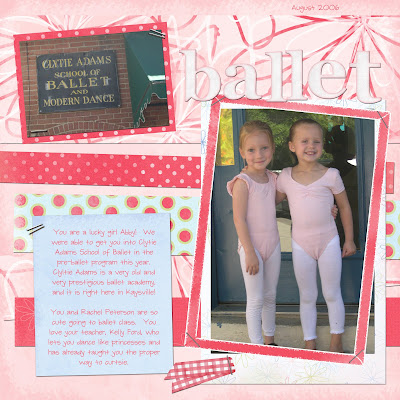
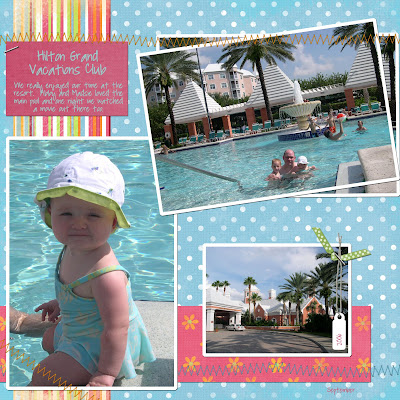
I hope this brief introduction to the wonderful world of Digital Scrapbooking has inspired you to check it out! Your scrapbooking life may never be the same when you see what you can quickly do with DS! I can make a page in 15 minutes or so that I am happy about. Here are a few examples of pages I have made. Good Luck!
Digital Scrapbooking Introduction
Imagine for a minute that the only things you needed to make amazing scrapbook pages are your digital photos and your computer! No more expensive brads, tags, punches, scissors, glue, endless supplies of cardstock, paper, ribbons, embellishments, photos you printed and never use, etc! No more running out of the right colors of anything or getting stuck, or realizing you cropped a picture too small or wishing you had an enlargement! Oh, and to clean up, just shut down Photoshop! Perfect with little kids around! If you have a few minutes, open up your page, and then finish at your leisure. When you are done, email the pages easily to family and friends, print them and back them up on your computer or CD/DVD!
Digital Scrapbooking (DS) is simply AMAZING! I am going to outline just a few things you can do in a program like Adobe PhotoShop CS:
1. Recolor pictures – the sky is the limit here with your creativity, but if you are a traditionalist you can do sepia and black and white instantly…
2. Resize pictures – you can easily and quickly crop or resize any picture, into any shape you like! You can enlarge and reduce!
3. Recolor paper, ribbons and embellishments – do you need just the right color cardstock or ribbon? You can recolor (almost) anything! So, once you stock up on some basic ribbons in digital format, you have every ribbon you will ever need.
4. Go back and undo or edit anything!
5. Print as many copies as you like!
6. Make darling custom photo announcements for baby births, birthday parties or Christmas cards!
So how do you get started?
The best way I know how to tell anyone, and how I learned, is in a class. Check around and see if any local adult education classes, college classes or other places have classes. Ask at your local scrapbook store. Most colleges will have PhotoShop classes, however, this may be hard to translate into scrapbooking and may focus mostly on photos. Just for reference, the class I took was 12 hours long, and I feel like we barely scratched the surface…Another note, and not to be discouraging, but PhotoShop is not something that is easily self-taught…even if you are kind of a computer guru, it would still be hard…
There is a site I know of that does offer an on-line class specifically for Digital Scrapbooking:
http://www.digitalscrapbookplace.com/university/Scrapping101/basics.shtml
These sites offer some tutorials:
http://www.theshabbyshoppe.com/tutorials/software_tutorials.asp
http://scrapbook-elements.com/sbe/index.php?option=com_content&task=section&id=13&Itemid=97
So, one of the fun ways to get interested is to look at Galleries to see the amazing pages other normal people are making! Here are a few of my favorite inspiration spots:
http://twopeasinabucket.kaboose.com/pg.asp?gallery=4
http://www.theshabbyshoppe.com/photopost/showgallery.php?cat=506
http://heatheranndesigns.com/pp/
Deciding if DS is for you!
So after you have perused some sights, looked at some galleries and done a little research on your own, you will need to decide if DS is for you…
1. Selecting a DS program. There are a lot of options out there, but the only 2 programs I recommend are Adobe PhotoShop CS (#1 pick) and Adobe PhotoShop Elements. PhotoShop CS is expensive…last I checked I think around $700…so this is a big investment. This is what I have, and it will give you the most functionality and flexibility. Elements is significantly cheaper (Costco had it a few months back for like $50 after rebate) but you lose functionality. I would not even bother with any of the prepackaged Scrapbooking programs – they are very limited and you cannot buy any of the kits, embellishments, etc. you see for sale on the sites under Shopping below. If you or a family member are enrolled in a college or university, see if you can get a significant discount on PhotoShop that way. I personally feel like I save a fortune DS by not using all of the paper, wasted supplies, and wasted photos that traditional scrapbooking used to waste.
2. Decide if you will miss the hands on approach of traditional scrapbooking. Personally, I do not miss it, but I also belong to a card club and we make handmade cards each quarter so I don’t miss the physical paper/embellishment part of scrapbooking.
This link will take you to my favorite digital scrapbooking store front – Michelle Coleman was my teacher and she is so talented! I feel so lucky to have had one of THE best designers in the industry teach my class!
http://www.littledreamerdesigns.com/shoppe/index.php
Here is her blog too, sometimes she gives away freebies!
http://mysecondmile.blogspot.com/
The FUN Part – Shopping!
Ok, first off let me tell you that the shopping for DS supplies can be 100% addictive, I have to control myself because there is so much gorgeous stuff available!
Here are 2 ways to save money:
1. Download as many freebies as you can, there are many, many freebies available and remember, you can recolor and resize almost anything!
2. Watch for sales and get on the email newsletters for the shopping sites you love. I often get 50% or more off of my orders this way.
Here are my all-time favorite stores (in no particular order)!
http://heatheranndesigns.net/catalog/hadtemplate.php?tname=products
http://www.designbydani.com/store/index.php
http://www.theshabbyshoppe.com/scripts/homepage.asp
http://scrapartist.com/store/index.php
I hope this brief introduction to the wonderful world of Digital Scrapbooking has inspired you to check it out! Your scrapbooking life may never be the same when you see what you can quickly do with DS! I can make a page in 15 minutes or so that I am happy about. Here are a few examples of pages I have made. Good Luck!


Wednesday, June 20, 2007
Tuesday, June 19, 2007
Frizzy Hair
I am originally from Utah, where humidity is rare. Now that I live in the heat and humidity of San Antonio, I am experiencing for the first time some frizziness, but don't know how to combat it. Do any of you have suggestions? Favorite products? Anything other than the ponytail solution I am currently using?
HP Cheats
I have to preface this post. If I could, I would have read all Harry Potter books a second time this year to make sure I'm ready to read Number 7. I believe both of my sisters are doing this/have done this. I really should...reading comprehension was always my lower score on standardized tests. But I also have a problem of falling asleep when I read so I just haven't been able to.
Seeing as I do forget things that I read and I want to be fully prepared for "HP and the Deathly Hallows", I found this site that gives chapter summaries in case any other Muggles have the same need that I do.
Seeing as I do forget things that I read and I want to be fully prepared for "HP and the Deathly Hallows", I found this site that gives chapter summaries in case any other Muggles have the same need that I do.
Monday, June 18, 2007
Frozen Corn on the Cob
Okay, this is a totally random post. I was buying frozen veggies the other day, and saw a bag of Green Giant half corn cobs. My three year old LOVES corn on the cob, so I got them, thinking that she'd be in seventh heaven, and we'd be able to get through next winter without her pining for some. Unfortunately, it was totally chewy and inedible. Even my daughter took one bite and wouldn't touch it again. Granted, maybe it was my fault for steaming them in the microwave (like I do with every other frozen veggie) instead of boiling them, but I think my daughter will have to be having a serious craving in the dead of winter before I think about getting those again! Thank goodness it's summer, and we can just buy fresh!
Sunday, June 17, 2007
Carseat Stiff Neck
Do you know what I'm talking about? It's when your baby finally graduates to a forward facing carseat and you're all excited. Only now, the carseat is sitting up and not at a nice recline like carriers. So all of a sudden napping becomes dangerous for her neck. Or at least uncomfortable! Every week, my little one falls asleep on the way home from church. She gets a lot of catnap time in the car as a matter of fact. But I feel so bad as I watch her little head bob and when I try to reach back and fix it, it does nothing! She just goes back. I don't think I put her carseat in wrong so I must not be the only one out there with this problem. On our last road trip though, I felt so bad for hour after hour of head bobbing action. Have any of you figured out a way to help this problem????
Subscribe to:
Posts (Atom)

