
I met a gal at a park the other day who told me about this neat website called Meetup.com. You type in your zip code and all these groups show up wherein you can find others with similar interests in your area. She used the site to find a Mommy and Me group that meets together several times a week at parks, malls, people's houses, etc. in our hometown. The group has its own guidelines that make it safe and organized, and there are already like 45 moms who joined it. Pretty cool, huh? I ended up joining it too and it's sounds really fun! Anyway, I just thought I'd mention it for anyone who is interested in looking around their own area for opportunities to meet some friends of different faiths. Even though I love my cozy LDS network, it's also nice to talk to other people in my community and maybe even have an opportunity to share the gospel. Hopefully this will be a good way to do just that!
P.S. It's been awhile since I've posted (and I've missed you all!) and I just want to say I LOVE the new template! SO so cute.
P.P.S. In case you don't remember me, I used to be "tagteamo3." But now, due to my husband getting his own gmail account, I am just Lisa. :)
Showing posts with label hobbies. Show all posts
Showing posts with label hobbies. Show all posts
Thursday, September 11, 2008

Monday, October 22, 2007
Humanitarian Aid
Tonight for Family Home Evening, Michael and I discussed Humanitarian Aid and we found this great site on the church's website:
http://www.lds.org/ldsfoundation/accelwork/humanintereststory/0,7989,1325--9-1100,00.html
The site is a list of all the humanitarian aid projects you can make (along with guidelines and patterns). Out here, JoAnn Fabrics is having a sale on fleece, so we are making fleece mittens and scarves to send out. The website also has this list of current needs:
Crib Quilts - Priority Need
Infant outfits
Newborn Kits
Children's mittens and gloves (all sizes)
Crib sheets (42" X 72")
Children's lightweight pajamas (sizes 2-12)
Fabric activity books (quiet books)
Boys pants (size 2-12)
Receiving blankets
Children's socks (sizes 3-12)
Plus there are a lot more projects on the website I listed. Just thought I'd spread the word. It makes a great project for the colder days!
http://www.lds.org/ldsfoundation/accelwork/humanintereststory/0,7989,1325--9-1100,00.html
The site is a list of all the humanitarian aid projects you can make (along with guidelines and patterns). Out here, JoAnn Fabrics is having a sale on fleece, so we are making fleece mittens and scarves to send out. The website also has this list of current needs:
Crib Quilts - Priority Need
Infant outfits
Newborn Kits
Children's mittens and gloves (all sizes)
Crib sheets (42" X 72")
Children's lightweight pajamas (sizes 2-12)
Fabric activity books (quiet books)
Boys pants (size 2-12)
Receiving blankets
Children's socks (sizes 3-12)
Plus there are a lot more projects on the website I listed. Just thought I'd spread the word. It makes a great project for the colder days!
Tuesday, October 16, 2007
Vinyl Lettering

I found this blog one day while I was surfing. I know vinyl lettering is big in Utah but it's just making it's way out to Minnesota. I love the signs with the family name with Families are Forever overlaid. Since we don't have this readily available, are these prices good? We might be doing it for Enrichment soon (yay!) so I might not have to try to track my own down. The girl who runs this blog also said we could do it ourselves. Anyone done it? Is it easy?
Wednesday, September 12, 2007
Fall Premiere Week is coming!

I'm going to admit it. I watch too much TV and I enjoy my share of shows. I'm a longtime LOST addict-I'm bummed they won't be back for a while but hoping that means I can catch up with their competition and another favorite, Medium. And for me, of course, Grey's Anatomy . Some of the new ABC shows look good too. I like Christina Applegate (is that her name?) so I think Samantha Who? looks fun and I'm fascinated by the Pushing Daisies. I'm also intrigued by a few of the NBC shows like Bionic Woman and Chuck.
Any other TV junkies out there? What are you looking forward to?
Sunday, August 19, 2007
My latest project
I have a knack for getting excited about new projects...and then not finishing them. (But that's another topic.) Anyway, I thought I'd share my latest, since it may be something one of you would be interested in. I got a subscription to Parenting magazine when I was pregnant. In the "newborn" days I usually didn't even take them out of the plastic, for lack of reading time. I remember a girl at work reading one, and I was like, "Oh, you actually read that?" But lately, I have been way more into them. I usually read them cover to cover, and I love taking them in the car when my husband is driving. However, my dilemma was what to do with them when I was done. I had been saving them, because I thought, "That potty training article will come in handy in a year or two," or "That's a fun idea of something to do with toddlers!" But in reality, how am I ever going to remember to look up that particular article in that particular issue when the time comes? And, space is a major issue for us right now! Soooo.....
I bought a plastic recipe box, and little alphabetized separaters. Now, I am working on going through the issues and cutting out things that I think I will want to refer to later, and then filing them. I'm not necessarily cutting out whole articles, especially because it's just a little recipe box. The thing that I especially wanted to save was the little tips and ideas about fun things to do with children. For instance, Parenting magazine has a page every issue called Play List, with ideas for things that are creative and can just be done around the house without spending money. For example, from this month's issue, one of the ideas is ways to use cookie cutters, like using them for stencils, play dough, and melon, etc.
Anyway, I thought it was a good way to "de-junk" my house of magazines, and it'll be a quick easy reference for ways to entertain a bored toddler in a couple of years, when I run out of ideas!
I bought a plastic recipe box, and little alphabetized separaters. Now, I am working on going through the issues and cutting out things that I think I will want to refer to later, and then filing them. I'm not necessarily cutting out whole articles, especially because it's just a little recipe box. The thing that I especially wanted to save was the little tips and ideas about fun things to do with children. For instance, Parenting magazine has a page every issue called Play List, with ideas for things that are creative and can just be done around the house without spending money. For example, from this month's issue, one of the ideas is ways to use cookie cutters, like using them for stencils, play dough, and melon, etc.
Anyway, I thought it was a good way to "de-junk" my house of magazines, and it'll be a quick easy reference for ways to entertain a bored toddler in a couple of years, when I run out of ideas!
Monday, August 13, 2007
Post-Potter Depression
I found this blog surfing and wanted to share. I have felt so sad that Harry is done and there won't be any more books so I'm excited to discover some new series that I'll hopefully enjoy as well! Happy Reading!
Wednesday, August 1, 2007
Getting to your roots
During the summer of 2003 I had THE strangest dream. I was playing on a playground with a boy would was about 14-years-old. We must have been playing alone for hours when the boy said to me, "I wish I could go play over there," as he pointed across a long patch of grass. When I turned to look at the spot where he was pointing I saw thousands of people, none of which I could make out because they were far away, and they too were playing on what looked like an enormous playground. I turned back to the young man and found that he was standing next to a very old gentleman. The boy didn't say anything else to me, but the older man said, "Don't you know who this is? This is your great-great-great uncle, and I am your great-great-great grandpa." Then I woke up.
I definitely don't consider myself an "expert" but I'd like to share one of my secret passions with you: family history and genealogy. The morning after I had my strange dream I talked to my mom about what had been said to me. (I thought she would laugh at it because she is the QUEEN of family history...after all, how could there be someone missing from my family tree when my mom was spending 8 hours a week doing genealogy?) Instead she told me I did have a missing g-g-g-uncle. He had run away from home when he was about 14 years old and was never heard from again.
To make a very long story shorter, George Brown (my missing uncle) was found during the spring of 2006 when England released their 1880 London census to the Church's family history center. Can you believe it?!? He was married and had children of his own.
Family History seems like a daunting task, especially if you don't know much about it. I thought maybe I could share some things that might help.
1. If you're starting from scratch you'll need to start with your own, personal 4-generation chart (the chart linked here requires Adobe). Get as much information as you can: full names, birth dates and places, and death dates and places.
*FYI: When you write a woman's full name in any kind of family history you only use their MAIDEN name.
*Dates also have a universal way of being written: Day/Month (in a 3-letter abbreviation)/Full year. For example today is 01 AUG 2007, and Christmas will be 25 DEC 2007.
Some of you might still have church leaders who tell you to submit a 4-generation chart to the Salt Lake Family History center (FHC). Although the FHC wouldn't turn your sheet away, this form of information is obsolete now. The church would actually rather have you submit a PAF file, which will be discussed below.
2. The LDS Church has one of the best family history search engines out there. But don't try to search for someone who is living...they're not in there! Start by searching for the most recent death in your family. This would most likely be a grandparent. All you need is their first and last name, any other information will help narrow your search. Familysearch.org is great because the search results will include different spellings or the name you're searching for. Your search results will come from a few different places: Information other people have submitted, census records, Social Security death index, international information gathered by the church, and personal websites that include the person you're searching for.
3. If you're really interested down load the church's PAF program. (Scroll down on this page and click on the "Free PAF Program link). This is a fantastic computer program...and it's free! A PAF is a "Personal Ancestry File" that you use on the computer. It has taken the place of the church's infamous "4-generation chart." At any time you wish you may upload your PAF online to the Church's Family History head-quarters, where it will later be made available online to the entire world.
4. Once you are able to record all of the information you can based on what you and your family members know you start researching. It's not nearly as boring as it sounds. Although, I won't bother you with it now.
I hope this was informative or interesting, or at least a good way to kill some time...any questions?
I definitely don't consider myself an "expert" but I'd like to share one of my secret passions with you: family history and genealogy. The morning after I had my strange dream I talked to my mom about what had been said to me. (I thought she would laugh at it because she is the QUEEN of family history...after all, how could there be someone missing from my family tree when my mom was spending 8 hours a week doing genealogy?) Instead she told me I did have a missing g-g-g-uncle. He had run away from home when he was about 14 years old and was never heard from again.
To make a very long story shorter, George Brown (my missing uncle) was found during the spring of 2006 when England released their 1880 London census to the Church's family history center. Can you believe it?!? He was married and had children of his own.
Family History seems like a daunting task, especially if you don't know much about it. I thought maybe I could share some things that might help.
1. If you're starting from scratch you'll need to start with your own, personal 4-generation chart (the chart linked here requires Adobe). Get as much information as you can: full names, birth dates and places, and death dates and places.
*FYI: When you write a woman's full name in any kind of family history you only use their MAIDEN name.
*Dates also have a universal way of being written: Day/Month (in a 3-letter abbreviation)/Full year. For example today is 01 AUG 2007, and Christmas will be 25 DEC 2007.
Some of you might still have church leaders who tell you to submit a 4-generation chart to the Salt Lake Family History center (FHC). Although the FHC wouldn't turn your sheet away, this form of information is obsolete now. The church would actually rather have you submit a PAF file, which will be discussed below.
2. The LDS Church has one of the best family history search engines out there. But don't try to search for someone who is living...they're not in there! Start by searching for the most recent death in your family. This would most likely be a grandparent. All you need is their first and last name, any other information will help narrow your search. Familysearch.org is great because the search results will include different spellings or the name you're searching for. Your search results will come from a few different places: Information other people have submitted, census records, Social Security death index, international information gathered by the church, and personal websites that include the person you're searching for.
3. If you're really interested down load the church's PAF program. (Scroll down on this page and click on the "Free PAF Program link). This is a fantastic computer program...and it's free! A PAF is a "Personal Ancestry File" that you use on the computer. It has taken the place of the church's infamous "4-generation chart." At any time you wish you may upload your PAF online to the Church's Family History head-quarters, where it will later be made available online to the entire world.
4. Once you are able to record all of the information you can based on what you and your family members know you start researching. It's not nearly as boring as it sounds. Although, I won't bother you with it now.
I hope this was informative or interesting, or at least a good way to kill some time...any questions?
Monday, June 25, 2007
Tutus!
We have lots of little girls in this group and I recently found this and thought it looked so fun and easy and hopefully cheap! It's a No-Sew Tutu where you just tie the tutu fabric in knots to an elastic band! My little one is ALMOST ready for dress up (I say this as she is demanding to change her clothes for the third time and it's only 8am!!!) Anyway, enjoy!
Friday, June 22, 2007
DS example
My SIL added some comments to answer your questions about digital scrapbooking. Here is the example she referred to in one of her comments:

Thursday, June 21, 2007
Digital Scrapbooking!
Hey Sugar & Spice sistahs! I asked my incredibly talented and creative sister-in-law to put together a "guest post" for us on digital scrapbooking as there was a post on it awhile ago. She has spent a lot of time compiling a fabulous introduction to digital scrapbooking for us. Enjoy!
Digital Scrapbooking Introduction
Imagine for a minute that the only things you needed to make amazing scrapbook pages are your digital photos and your computer! No more expensive brads, tags, punches, scissors, glue, endless supplies of cardstock, paper, ribbons, embellishments, photos you printed and never use, etc! No more running out of the right colors of anything or getting stuck, or realizing you cropped a picture too small or wishing you had an enlargement! Oh, and to clean up, just shut down Photoshop! Perfect with little kids around! If you have a few minutes, open up your page, and then finish at your leisure. When you are done, email the pages easily to family and friends, print them and back them up on your computer or CD/DVD!
Digital Scrapbooking (DS) is simply AMAZING! I am going to outline just a few things you can do in a program like Adobe PhotoShop CS:
1. Recolor pictures – the sky is the limit here with your creativity, but if you are a traditionalist you can do sepia and black and white instantly…
2. Resize pictures – you can easily and quickly crop or resize any picture, into any shape you like! You can enlarge and reduce!
3. Recolor paper, ribbons and embellishments – do you need just the right color cardstock or ribbon? You can recolor (almost) anything! So, once you stock up on some basic ribbons in digital format, you have every ribbon you will ever need.
4. Go back and undo or edit anything!
5. Print as many copies as you like!
6. Make darling custom photo announcements for baby births, birthday parties or Christmas cards!
So how do you get started?
The best way I know how to tell anyone, and how I learned, is in a class. Check around and see if any local adult education classes, college classes or other places have classes. Ask at your local scrapbook store. Most colleges will have PhotoShop classes, however, this may be hard to translate into scrapbooking and may focus mostly on photos. Just for reference, the class I took was 12 hours long, and I feel like we barely scratched the surface…Another note, and not to be discouraging, but PhotoShop is not something that is easily self-taught…even if you are kind of a computer guru, it would still be hard…
There is a site I know of that does offer an on-line class specifically for Digital Scrapbooking:
http://www.digitalscrapbookplace.com/university/Scrapping101/basics.shtml
These sites offer some tutorials:
http://www.theshabbyshoppe.com/tutorials/software_tutorials.asp
http://scrapbook-elements.com/sbe/index.php?option=com_content&task=section&id=13&Itemid=97
So, one of the fun ways to get interested is to look at Galleries to see the amazing pages other normal people are making! Here are a few of my favorite inspiration spots:
http://twopeasinabucket.kaboose.com/pg.asp?gallery=4
http://www.theshabbyshoppe.com/photopost/showgallery.php?cat=506
http://heatheranndesigns.com/pp/
Deciding if DS is for you!
So after you have perused some sights, looked at some galleries and done a little research on your own, you will need to decide if DS is for you…
1. Selecting a DS program. There are a lot of options out there, but the only 2 programs I recommend are Adobe PhotoShop CS (#1 pick) and Adobe PhotoShop Elements. PhotoShop CS is expensive…last I checked I think around $700…so this is a big investment. This is what I have, and it will give you the most functionality and flexibility. Elements is significantly cheaper (Costco had it a few months back for like $50 after rebate) but you lose functionality. I would not even bother with any of the prepackaged Scrapbooking programs – they are very limited and you cannot buy any of the kits, embellishments, etc. you see for sale on the sites under Shopping below. If you or a family member are enrolled in a college or university, see if you can get a significant discount on PhotoShop that way. I personally feel like I save a fortune DS by not using all of the paper, wasted supplies, and wasted photos that traditional scrapbooking used to waste.
2. Decide if you will miss the hands on approach of traditional scrapbooking. Personally, I do not miss it, but I also belong to a card club and we make handmade cards each quarter so I don’t miss the physical paper/embellishment part of scrapbooking.
This link will take you to my favorite digital scrapbooking store front – Michelle Coleman was my teacher and she is so talented! I feel so lucky to have had one of THE best designers in the industry teach my class!
http://www.littledreamerdesigns.com/shoppe/index.php
Here is her blog too, sometimes she gives away freebies!
http://mysecondmile.blogspot.com/
The FUN Part – Shopping!
Ok, first off let me tell you that the shopping for DS supplies can be 100% addictive, I have to control myself because there is so much gorgeous stuff available!
Here are 2 ways to save money:
1. Download as many freebies as you can, there are many, many freebies available and remember, you can recolor and resize almost anything!
2. Watch for sales and get on the email newsletters for the shopping sites you love. I often get 50% or more off of my orders this way.
Here are my all-time favorite stores (in no particular order)!
http://heatheranndesigns.net/catalog/hadtemplate.php?tname=products
http://www.designbydani.com/store/index.php
http://www.theshabbyshoppe.com/scripts/homepage.asp
http://scrapartist.com/store/index.php
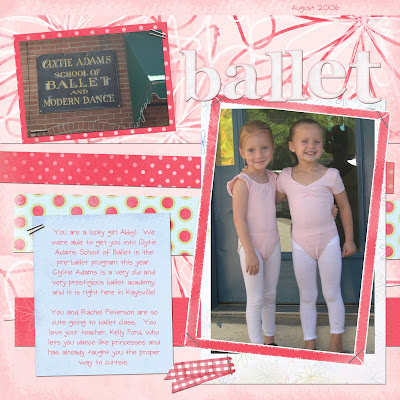
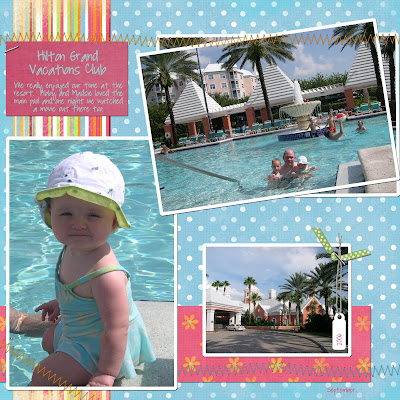
I hope this brief introduction to the wonderful world of Digital Scrapbooking has inspired you to check it out! Your scrapbooking life may never be the same when you see what you can quickly do with DS! I can make a page in 15 minutes or so that I am happy about. Here are a few examples of pages I have made. Good Luck!
Digital Scrapbooking Introduction
Imagine for a minute that the only things you needed to make amazing scrapbook pages are your digital photos and your computer! No more expensive brads, tags, punches, scissors, glue, endless supplies of cardstock, paper, ribbons, embellishments, photos you printed and never use, etc! No more running out of the right colors of anything or getting stuck, or realizing you cropped a picture too small or wishing you had an enlargement! Oh, and to clean up, just shut down Photoshop! Perfect with little kids around! If you have a few minutes, open up your page, and then finish at your leisure. When you are done, email the pages easily to family and friends, print them and back them up on your computer or CD/DVD!
Digital Scrapbooking (DS) is simply AMAZING! I am going to outline just a few things you can do in a program like Adobe PhotoShop CS:
1. Recolor pictures – the sky is the limit here with your creativity, but if you are a traditionalist you can do sepia and black and white instantly…
2. Resize pictures – you can easily and quickly crop or resize any picture, into any shape you like! You can enlarge and reduce!
3. Recolor paper, ribbons and embellishments – do you need just the right color cardstock or ribbon? You can recolor (almost) anything! So, once you stock up on some basic ribbons in digital format, you have every ribbon you will ever need.
4. Go back and undo or edit anything!
5. Print as many copies as you like!
6. Make darling custom photo announcements for baby births, birthday parties or Christmas cards!
So how do you get started?
The best way I know how to tell anyone, and how I learned, is in a class. Check around and see if any local adult education classes, college classes or other places have classes. Ask at your local scrapbook store. Most colleges will have PhotoShop classes, however, this may be hard to translate into scrapbooking and may focus mostly on photos. Just for reference, the class I took was 12 hours long, and I feel like we barely scratched the surface…Another note, and not to be discouraging, but PhotoShop is not something that is easily self-taught…even if you are kind of a computer guru, it would still be hard…
There is a site I know of that does offer an on-line class specifically for Digital Scrapbooking:
http://www.digitalscrapbookplace.com/university/Scrapping101/basics.shtml
These sites offer some tutorials:
http://www.theshabbyshoppe.com/tutorials/software_tutorials.asp
http://scrapbook-elements.com/sbe/index.php?option=com_content&task=section&id=13&Itemid=97
So, one of the fun ways to get interested is to look at Galleries to see the amazing pages other normal people are making! Here are a few of my favorite inspiration spots:
http://twopeasinabucket.kaboose.com/pg.asp?gallery=4
http://www.theshabbyshoppe.com/photopost/showgallery.php?cat=506
http://heatheranndesigns.com/pp/
Deciding if DS is for you!
So after you have perused some sights, looked at some galleries and done a little research on your own, you will need to decide if DS is for you…
1. Selecting a DS program. There are a lot of options out there, but the only 2 programs I recommend are Adobe PhotoShop CS (#1 pick) and Adobe PhotoShop Elements. PhotoShop CS is expensive…last I checked I think around $700…so this is a big investment. This is what I have, and it will give you the most functionality and flexibility. Elements is significantly cheaper (Costco had it a few months back for like $50 after rebate) but you lose functionality. I would not even bother with any of the prepackaged Scrapbooking programs – they are very limited and you cannot buy any of the kits, embellishments, etc. you see for sale on the sites under Shopping below. If you or a family member are enrolled in a college or university, see if you can get a significant discount on PhotoShop that way. I personally feel like I save a fortune DS by not using all of the paper, wasted supplies, and wasted photos that traditional scrapbooking used to waste.
2. Decide if you will miss the hands on approach of traditional scrapbooking. Personally, I do not miss it, but I also belong to a card club and we make handmade cards each quarter so I don’t miss the physical paper/embellishment part of scrapbooking.
This link will take you to my favorite digital scrapbooking store front – Michelle Coleman was my teacher and she is so talented! I feel so lucky to have had one of THE best designers in the industry teach my class!
http://www.littledreamerdesigns.com/shoppe/index.php
Here is her blog too, sometimes she gives away freebies!
http://mysecondmile.blogspot.com/
The FUN Part – Shopping!
Ok, first off let me tell you that the shopping for DS supplies can be 100% addictive, I have to control myself because there is so much gorgeous stuff available!
Here are 2 ways to save money:
1. Download as many freebies as you can, there are many, many freebies available and remember, you can recolor and resize almost anything!
2. Watch for sales and get on the email newsletters for the shopping sites you love. I often get 50% or more off of my orders this way.
Here are my all-time favorite stores (in no particular order)!
http://heatheranndesigns.net/catalog/hadtemplate.php?tname=products
http://www.designbydani.com/store/index.php
http://www.theshabbyshoppe.com/scripts/homepage.asp
http://scrapartist.com/store/index.php
I hope this brief introduction to the wonderful world of Digital Scrapbooking has inspired you to check it out! Your scrapbooking life may never be the same when you see what you can quickly do with DS! I can make a page in 15 minutes or so that I am happy about. Here are a few examples of pages I have made. Good Luck!


Tuesday, June 19, 2007
HP Cheats
I have to preface this post. If I could, I would have read all Harry Potter books a second time this year to make sure I'm ready to read Number 7. I believe both of my sisters are doing this/have done this. I really should...reading comprehension was always my lower score on standardized tests. But I also have a problem of falling asleep when I read so I just haven't been able to.
Seeing as I do forget things that I read and I want to be fully prepared for "HP and the Deathly Hallows", I found this site that gives chapter summaries in case any other Muggles have the same need that I do.
Seeing as I do forget things that I read and I want to be fully prepared for "HP and the Deathly Hallows", I found this site that gives chapter summaries in case any other Muggles have the same need that I do.
Wednesday, June 13, 2007
Camping, anyone?
Are any of you campers? We love to camp but haven't been since our little one was five months, not crawling and not walking! Now it's a different story! Any tips on keeping them contained, safe, etc?
Friday, May 25, 2007
I'm Lost without Lost
Okay, I know there are at least a couple of you out there who are LOST fans, and I just have to say, that was a CrAzY season finale! The Others were practically all taken down in like one episode. I wonder what plot they are going to take on next?? And are they starting to do flash-forwards instead of flashbacks? How wild is that? This show is just amazing. Anyway, let me know what your comments are about this. Let's have a little discussion.
Monday, May 21, 2007
Scrapbook storage
I have not scrapbooked since the night I started labor. I think part of why I don't get to it very often is because it seems like it takes a lot of time to get materials out, get organized, and get started. I have a large rubbermaid container with most of my supplies and some ziploc bags that separate stickers from scraps of paper and stuff like that. I have a small Rubbermaid for pens and scissors and last year I finally got a 12 x 12 box for 12 x 12 paper. I have it all tucked in a closet, and it's not accessible. Does anyone have any storage ideas that have worked for them?
I really like the "doing something permanent everyday" idea that was brought up in the housework post and scrapbooking is one of those things you can do, but pulling it out for a few minutes in a day just isn't working for me at this point.
I really like the "doing something permanent everyday" idea that was brought up in the housework post and scrapbooking is one of those things you can do, but pulling it out for a few minutes in a day just isn't working for me at this point.
Friday, May 11, 2007
Another fun Book site!
I LOVE to read! I found this site this morning. I tried to read all the Newberrys once and didn't make it through half of them I'm sure but I also found some new favorite books! (I have way too many favorites to name!) I thought this was worthy of sharing with all you bookworms out there!
Wednesday, April 25, 2007
3rd Time's a Charm
As usual, this summer is going to be a big one for movie releases. Not so usual though, is the number of movies that are entering their 3rd chapter: "Spider-Man 3," "Shrek the Third" and "Pirates of the Caribbean: At World's End" debut within three weeks of one another. On top of that there's "Ocean's Thirteen," "The Bourne Ultimatum" and "Rush Hour 3." I'm usually one of those sluggish movie-goers who waits until the movie hits the $3 Theater or gets to the rental stores. This summer I find myself a little excited about a couple of these sequels, namely "Ocean's Thirteen" and "The Bourne Ultimatum." I sure hope they deliver like their predecessors. Looks like I'm gonna need to add a little extra to our summer bugdet!
Thursday, April 19, 2007
Digital Scrapbooking
 Has anyone ever heard of this?! I'm completely intrigued. I have very little creative blood running through this body of mine, so the idea of putting together a "pre-created" scrapbook page thrills me!!
Monday, April 9, 2007
Homemade Cookie Bouquets
I have always thought cookie bouquets were such a neat gift idea, but they're pretty expensive so I decided to try to make my own a couple of weeks ago and was happy to find they were fairly easy to make. I just thought I'd share what I did since I know I'm always looking for cute, easy, unique, and inexpensive gift ideas. I am NOT a crafty person at all, but somehow these turned out pretty well.
Here are a couple of pictures of the ones I made. I made three Easter ones, but you could really make them for any occasion.
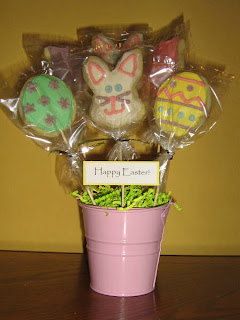
 I bought the buckets for $1 each at Wal-mart. Inside the buckets I put a piece of green floral arranging foam and covered it with Easter grass (the foam pieces were about $1 each too).
I then made some regular sugar cookies and slid a bamboo skewer in the bottom of each one as close to the top of the dough as possible before cooking them. I wet the bamboo skewers ahead of time because I was afraid they'd burn in the oven or something. I baked the cookies, let them cool on the pan some and then transferred them to a cooling rack to cool completely. I then made some icing, decorated the cookies (I got ideas by looking at professional cookie bouquets on the internet), and put them in some clear craft bags that came with twist ties. Then I just arranged the cookies in the foam and they were done. The little Happy Easter sign is just some cardstock taped to a toothpick.
An important side note:
I would put something heavy in the bottom of the buckets next time since they were pretty top heavy. I loaded them all into a pan to carry out to the car for delivery. It was really windy that day and when I got outside a big gust of wind came and knocked one of them all over the ground and the other two just fell over in the pan. It looked like a little bunny massacre. I was only able to salvage one of them. Oh well. It would probably also help to use something sturdier like popsicle sticks, but I like the height of the bamboo skewers.
Here are the recipes I used:
Sugar Cookies
Here are a couple of pictures of the ones I made. I made three Easter ones, but you could really make them for any occasion.

 I bought the buckets for $1 each at Wal-mart. Inside the buckets I put a piece of green floral arranging foam and covered it with Easter grass (the foam pieces were about $1 each too).
I then made some regular sugar cookies and slid a bamboo skewer in the bottom of each one as close to the top of the dough as possible before cooking them. I wet the bamboo skewers ahead of time because I was afraid they'd burn in the oven or something. I baked the cookies, let them cool on the pan some and then transferred them to a cooling rack to cool completely. I then made some icing, decorated the cookies (I got ideas by looking at professional cookie bouquets on the internet), and put them in some clear craft bags that came with twist ties. Then I just arranged the cookies in the foam and they were done. The little Happy Easter sign is just some cardstock taped to a toothpick.
An important side note:
I would put something heavy in the bottom of the buckets next time since they were pretty top heavy. I loaded them all into a pan to carry out to the car for delivery. It was really windy that day and when I got outside a big gust of wind came and knocked one of them all over the ground and the other two just fell over in the pan. It looked like a little bunny massacre. I was only able to salvage one of them. Oh well. It would probably also help to use something sturdier like popsicle sticks, but I like the height of the bamboo skewers.
Here are the recipes I used:
Sugar Cookies
- 1 c. sugar
- 1 egg
- 1/2 c. butter
- 1 c. sour cream
- 3 c. flour
- 1 tsp. baking soda
- 2 tsp. baking powder
- 1/2 tsp. salt
Mix sugar, egg, and butter together. Add sour cream. Mix well. Add flour, soda and baking powder. Roll on floured surface and cut into desired shapes. Bake at 350 degrees for 8 minutes.
Icing
- 1/2 c. Crisco
- 1/2 c. butter
- 2 tsp. vanilla
- 1 tsp. almond extract
- 1 tsp. lemon extract
- dash salt
- 5-6 c. powdered sugar
- Milk
Mix shortening, butter, extracts, and salt. Add powdered sugar and enough milk to make a good spreading consistency (I used a few teaspoons, but it could take a little more). Mix until light and fluffy.
Wednesday, March 28, 2007
Revealed
I'm not a huge Harry Potter follower, but I thought those who are might appreciate this. I saw it on CNN this afternoon. It's the cover to the final book. 
Wednesday, March 21, 2007
Hey Mr. DeeJay
I saw the post about russian websites to download cheap music... and it got me thinking.
Regardless of purpose/mood, what songs are a permanent part of your collection? Could be for anything: relaxing, working out, pondering, psyching yourself up, quality time with the honey, etc.
Regardless of purpose/mood, what songs are a permanent part of your collection? Could be for anything: relaxing, working out, pondering, psyching yourself up, quality time with the honey, etc.
Subscribe to:
Posts (Atom)
